





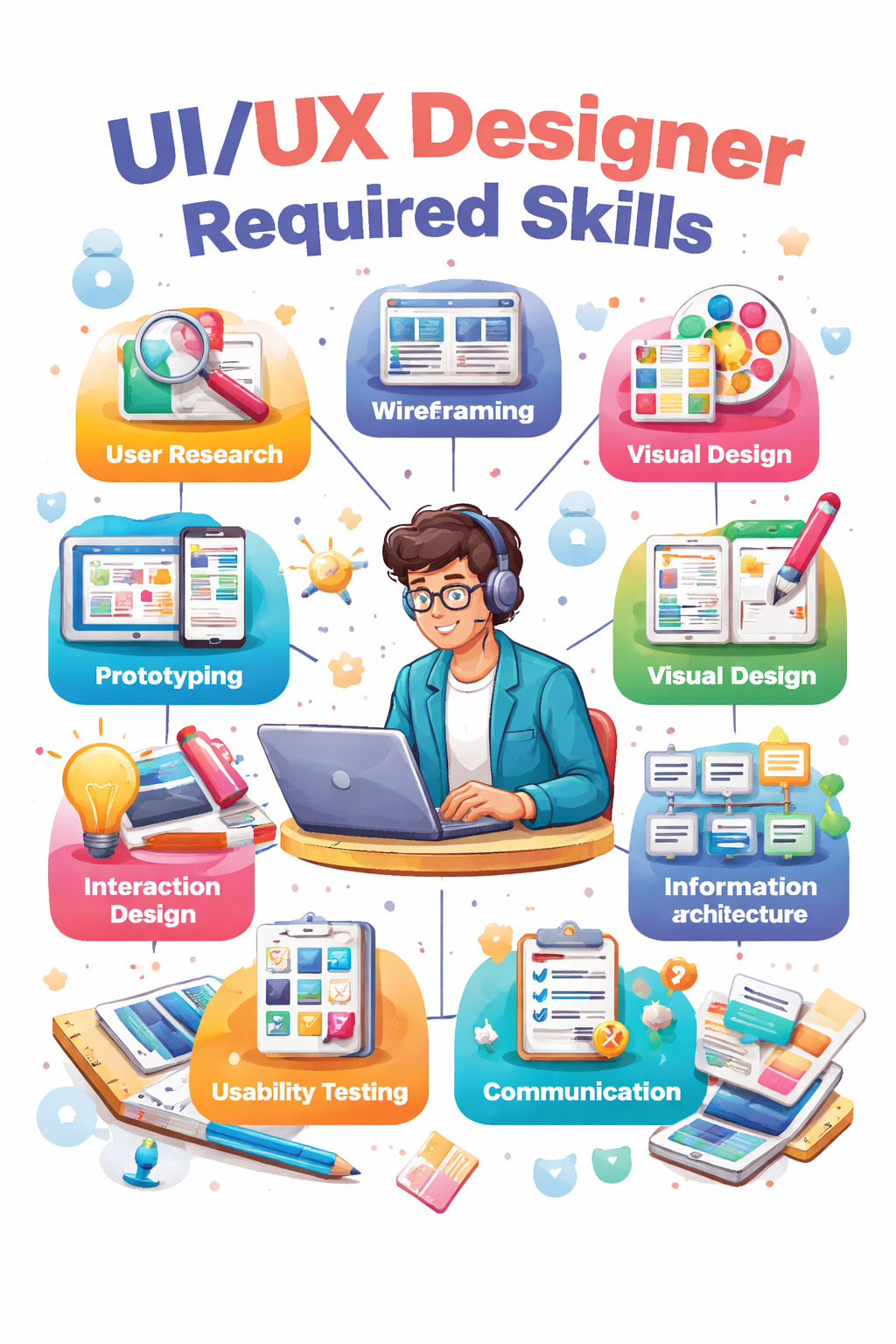
UI UX Designer Required Skills
If you’ve ever opened an app and thought, “Wow, this just feels right,” you’ve experienced great UI UX design. And if you’ve ever deleted an app out of frustration after five minutes, you’ve experienced bad design.
That’s the power of a UI UX designer.
But what exactly are the required skills to become a successful UI UX designer today? Is it just about learning a design tool? Is creativity enough? Or do you also require technical knowledge?
Let’s break it down in depth — not just surface-level skills, but the real, career-defining abilities that make companies compete to hire you.
Introduction to UI UX Design
Why UI UX Design Matters More Than Ever
We live in a digital-first world. From ordering food to managing bank accounts, nearly every interaction happens through a screen. Businesses no longer compete solely on price or product — they compete on the overall experience.
Think about it. Why do people choose one app over another when both offer the same service? Often, it’s because one is easier, faster, and more enjoyable to use. That’s UX. And why does one app look modern and trustworthy while another feels outdated? That’s UI.
In simple terms, UI UX design directly impacts user satisfaction, brand trust, and revenue. A small design improvement can increase conversions dramatically. That’s why companies value skilled designers more than ever.
The Growing Demand for UI UX Designers
The demand for UI UX designers continues to grow across industries — tech startups, e-commerce platforms, healthcare apps, fintech products, SaaS businesses, and even government services.
Why? Because every digital product needs thoughtful design. As long as apps and websites exist, UI UX designers will remain essential.
Understanding the Core Difference Between UI and UX
Before diving into required skills, clarity is important.
What Is User Interface (UI) Design?
UI design focuses on the visual layer of a product. It includes everything users see and interact with — buttons, typography, spacing, colors, icons, and layouts.
But here’s the key: UI isn’t just about making things look attractive. It’s about clarity. A good UI guides users naturally. It reduces confusion. It creates visual consistency.
UI design is where creativity meets structure.
What Is User Experience (UX) Design?
UX design focuses on how a product works and how users feel while using it. It includes research, user flows, testing, and solving usability issues.
UX designers ask:
- Is this easy to use?
- Can users achieve their goal quickly?
- Where might users get stuck?
UX is invisible when done right. Users don’t notice it — they just feel that everything works smoothly.
How UI and UX Work Together
UI without UX is decoration. UX without UI is incomplete.
Together, they create meaningful digital experiences.
Core Technical Skills Required for UI UX Designers
Now let’s talk about the foundational skills you absolutely must develop.
Wireframing and Prototyping
Wireframing is like creating a blueprint before building a house. It focuses on layout and structure without worrying about colors or final visuals.
Prototyping takes it further. It allows users and stakeholders to interact with the design before development begins.
This skill is essential because it:
- Saves time and development cost
- Identifies usability issues early
- Helps communicate ideas clearly
Without wireframing and prototyping skills, your design process lacks structure.
User Research and Analysis
Designing without research is like cooking without knowing who you're serving.
User research involves interviews, surveys, competitor analysis, and behavior studies. It helps you understand user pain points and motivations.
Great designers rely on evidence, not assumptions.
Information Architecture
Information architecture (IA) determines how content is structured and organized within a product.
If users can’t find what they’re looking for in seconds, the IA is flawed.
Strong IA ensures:
- Logical navigation
- Clear categorization
- Reduced cognitive load
Interaction Design
Interaction design focuses on how elements respond to user actions.
What happens when a button is clicked? How does a form respond to an error? These micro-interactions shape the overall experience.
Small details create big impressions.
Responsive and Adaptive Design
Users switch between devices constantly. Your design must work flawlessly across smartphones, tablets, and desktops.
Responsive design ensures flexibility and consistency across screen sizes.
Mastering UI Design Skills
Typography
Typography influences readability and brand personality. Choosing the wrong font can make even the best design feel unprofessional.
A UI designer must understand:
- Font pairing
- Line spacing
- Readability standards
Color Theory and Psychology
Colors trigger emotions. Blue feels trustworthy. Green feels calm. Red creates urgency.
Understanding color psychology helps designers guide user actions strategically.
Layout and Visual Hierarchy
Visual hierarchy directs the user’s attention.
By using size, contrast, spacing, and alignment effectively, you help users navigate effortlessly.
Design Systems and Component Libraries
Consistency builds trust. Design systems ensure consistent components across products, making collaboration smoother and scaling easier.
Advanced UX Skills That Elevate Your Career
User Personas and Journey Mapping
Personas represent your target users. Journey maps outline their interaction with your product from start to finish.
These tools ensure user-centered thinking throughout the design process.
Usability Testing Techniques
Usability testing reveals real-world issues.
Watching users interact with your product is eye-opening. You’ll discover problems you never noticed.
A/B Testing and Data Interpretation
Data-driven design leads to measurable improvements.
Testing variations helps determine what truly works.
Accessibility and Inclusive Design
Accessibility ensures products are usable for people with disabilities.
Designing inclusively expands your audience and improves usability for everyone.
Soft Skills That Make a Great UI UX Designer
Communication and Presentation
You must explain your design decisions clearly to developers, product managers, and stakeholders.
Empathy and Emotional Intelligence
Understanding user emotions allows you to design meaningful solutions.
Critical Thinking and Problem-Solving
Every design challenge is a problem waiting for a smart solution.
Time Management and Adaptability
Design projects have deadlines. Trends evolve. Adaptability keeps you relevant.
Conclusion
Becoming a successful UI UX designer requires more than learning a tool. It demands a balance of creativity, research, empathy, technical understanding, and business awareness.
Master the fundamentals. Practice consistently. Stay curious.
And remember — great design feels invisible, but its impact is unforgettable.
FAQs
1. What are the most important skills for a UI UX designer?
User research, wireframing, visual design, problem-solving, and communication are essential.
2. Is coding required for UI UX design?
Not mandatory, but basic coding knowledge provides a strong advantage.
3. How long does it take to master UI UX skills?
Typically, 6–12 months of consistent practice for entry-level proficiency.
4. Are UI UX designers in demand?
Yes, demand is growing across industries worldwide.
5. What tools should beginners start with?
Figma is highly recommended due to its versatility and collaboration features.
Recently Added Articles

.webp)



 Book A Free Demo
  7568111008
 Apply Now


 Please select course category